
Meowdoku Game
Free browser cat puzzle
Meowdoku is a relaxing cat puzzle game: place one cat in every row, every column and every colored region, and never let two cats touch. No download, no sign-up, no timer pressure — just a board that always has one logical answer.
- Price
- Free to play
- Playable boards
- 24 built-in
- Walkthroughs
- 20 guides
- Requirements
- Any browser
What Is Meowdoku?
Meowdoku is a free online cat sudoku puzzle you can play right in your browser — no download, no sign-up, no app store. Every puzzle is a tidy grid of colored regions, and your job is to place one cat in every row, one in every column and one inside each region, with no two cats ever touching. You can play Meowdoku online on desktop, tablet or phone, and every built-in board is free.
The rules are easy to learn in under a minute, yet the later boards reward real logic. Meowdoku sits somewhere between a classic sudoku and a cozy color-matching game: the same deductive thinking, but with a warm, friendly look and a pack of cats instead of bare numbers.
How to Play Meowdoku
- 1
Read the grid
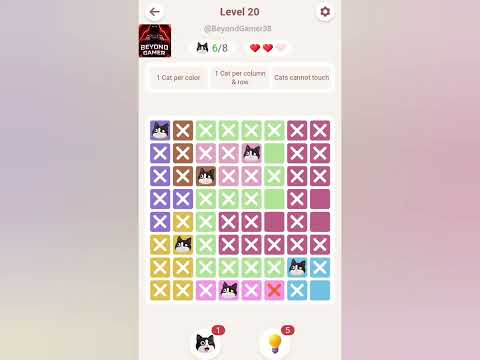
Each Meowdoku board is split into rows, columns and colored regions. Every cell must end up holding exactly one cat.
- 2
Mind the one-of-each rule
Every row, every column and every colored region finishes with exactly one cat, and no two cats may touch, diagonal corners included. Those conditions together are the whole game.
- 3
Tap or click a cell
Click or tap a cell to mark it, then click it again to place a cat. Nothing is locked until the board is solved, so a wrong idea only costs a click.
- 4
Finish the board
When every row, every column and every colored region holds exactly one cat with no touching pair anywhere, the puzzle is solved. You can then move on to the next of the 24 built-in boards, and every one is free.
Controls & Interface
- Mouse & touch
- Click or tap a cell to mark it with an X, and click it again to place a cat. A double-click or right-click drops a cat straight in, and a click on a filled cell clears it. Works the same on desktop and on phones.
- Hints & undo
- Undo takes back your last placement one step at a time. Each level also carries a short written hint for that board, shown inside the How to play dialog.
- Progress
- Your solved levels are saved locally, so you can close the tab and pick up where you left off.
Game Features
Play instantly, free
Runs in any modern browser on desktop, tablet, or phone. No install, no account, no paywall — just press play.
24 built-in levels
A full ladder of boards from 4×4 warm-ups up to 9×9 puzzles, and every one is checked to have a single solution that logic alone can reach.
Hints when you stall
Press the lightbulb and Meowdoku names a square the board already forces, with a one-line reason — it never places the cat for you.
A cozy daily puzzle
A fresh date-stamped board keeps the habit going, and a local timer and mistake counter let you chase your own best runs.
Meowdoku FAQ
Is Meowdoku free to play?
Yes. Meowdoku is completely free and runs in your browser. There is no download, no sign-up, and no in-app purchase — you can play all 24 built-in levels at no cost.
What are the rules of Meowdoku?
Place one cat in every row, one in every column and one inside each colored region, then check that no two cats are touching, corners included. Every cell ends up holding exactly one cat.
How many levels are there?
The built-in set has 24 levels, running from 4×4 warm-ups up to 9×9 boards, and a fresh daily puzzle is generated for each date. The walkthrough library is a separate, larger set: 310 guide pages, each with a written solution and a video answer.
Can I play Meowdoku on my phone?
Yes. Meowdoku works on phones, tablets, and desktops. Tap a cell to mark it and tap again to place a cat, and the layout adapts to smaller screens.
Do I need to solve it with pure logic, or can I guess?
Every board is designed to be solved by deduction alone, so you never have to guess. If you get stuck, the hint button names a square the board already forces and says why in one line.
Is there a new puzzle every day?
Yes. A date-stamped daily puzzle gives you a fresh board each day, alongside the 24 built-in boards you can play anytime.
Can I download Meowdoku as an app?
Yes — the official Meowdoku app is on the App Store and Google Play, and this page links to both listings. You do not need it to play here: the browser version on this site is the full 24-board game and needs no install.
Is this the official Meowdoku website?
No. Meowdoku is an independent fan project with its own browser implementation of the puzzle. It is not affiliated with Oakever Games, Grove42, Apple, or Google.
Can I play Meowdoku online without downloading it?
Yes. Meowdoku online runs in your browser — open the homepage, pick a board, and play. There is no download, sign-up or app store required.
Is Meowdoku online the same as the app?
The online version is this site's browser game. The app on the App Store and Google Play is the official Meowdoku app; this site is an independent fan project and is not affiliated with it. Use whichever you prefer — the browser version needs no install.
Explore Meowdoku Online
Guides for playing Meowdoku online, from the rules to advanced tips.
- How to Play Meowdoku
Rules, controls and a first board.
- Meowdoku Tips and Strategy
Beginner tips and advanced solving strategy.
- Cat Sudoku Guide
What cat sudoku is and how it differs from classic sudoku.
Featured Meowdoku Walkthroughs
Start with these boards — each card opens the written solution, the final cat positions and the video answer.



Find a Level Guide
Know the number? Jump straight to that walkthrough instead of scrolling the index.
Ready to Train Your Brain?
Twenty-four boards, one logical answer each, and hints for when a board finally bites back. Start with the first board and work up at your own pace.